

FAQs
Answers to common questions about catalogs, file formats, queries and your account.
1. I don't find the catalog I want. Why?
CosmoHub contains public and private catalogs belonging to different cosmology projects. Public catalogs are available for all CosmoHub users once their email is validated. Private catalogs are only available for users who has the data rights. Data rights are defined by each project.
2. Why can't I see the catalogs from my associated project (either Euclid, MICE, PAU or DES)?
The current way to validate a user who states to have data rights takes a bit of time. We have to confirm the user actually belongs to the project and have the data rights. Once this process is done the user will receive a confirmation email and the catalogs of that project will be available through the portal.
3. Why is not available my favourite "X" file format to create custom catalogs?
We decided to have four different file formats:
-
CSV.BZ2 format is our standard format either to produce custom catalogs or to save our raw data in the storage file system. There are plenty of bash tools to work with csv files. We encourage to read this post from Brian Conelly in which very useful commands are shown, and we also recommend python users to use the pandas dataframe package, which offers methods to work with csv files in a very easy way. Please have a look at the next FAQ where it is explained how to read CSV.BZ2 files created through CosmoHub.
-
FITS files is a request from several CosmoHub users. We welcome their encouragement to continue improving our platform. In order to make FITS files available we had to develop a driver, which can be found in the recarrayserde repository, to efficiently create FITS files from HIVE's output. There are also different packages and software to work with FITS files such as Topcat. Be careful with large FITS files since most of the software open and fully read it in memory.
-
ASDF format is a new data format for Astronony. We also add this format just in case some pioneer wants to use it and to include it in our article "CosmoHub on Hadoop: Interactive analysis and distribution of cosmological data", Tallada et al. 2020.
-
PARQUET format is an open source, column-oriented data file format designed for efficient data storage and retrieval. This format was the last one we have added to CosmoHub and the main reason, besides its popularity and efficiency, is that it is the only one that currently allows to deal with array elements.
3.1 How to download CosmoHub files into your computer?
There are several ways to download CosmoHub files into your computer. Here are two recommended methods:
Method 1: Using wget
Open your terminal and type the following command:
wget --content-disposition {LINK}
Replace {LINK} with the URL of the file you want to download. This command will download the file and automatically save it with its original filename.
Method 2: Using curl
Open your terminal and type the following command:
curl -JLO {LINK}
Again, replace {LINK} with the URL of the file you want to download. This command will download the file and save it with its original filename.
Note: If you are not familiar with the command line, you can also download files directly from the CosmoHub website by clicking on the download button next to the file you want to download.
4. How to deal with CosmoHub CSV.BZ2 files with pandas Python library?
The CSV.BZ2 files delivered by CosmoHub are built by concatenating a series of smaller CSV.BZ2 streams, each one of them produced in parallel on the Hadoop nodes. The resulting catalog may be larger than the amount of memory at your disposal, so we recommend working with the results in chunks. The following snippet of Python 3 code shows how to open and work with these kind of catalogs:
import pandas as pd

# Define the path to the catalog compressed CSV file:
catalog_filename = "/path_to_catalog_filename/XXX.csv.bz2"

# Define the list of columns that uniquely identify each row
index_col = ["whatever_gal_id"]

# Define the chunksize for processing the file, in number of rows
chunksize = 10000

# Open the file using pandas and read it in chunks:
for chunk in pd.read_csv(catalog_filename, sep=",", index_col=index_col, comment='#', na_values=r'\N', compression='bz2', chunksize=chunksize):
    print(chunk.head())
5. What User-Defined Functions (UDFs) are available in Expert mode?
Here follows the list of implemented functions, with links to its documentation. If you need a specific UDF not listed here, please contact us.
Math functions
udf.atan2(double y, double x)udf.erfc(double x)
HEALPix functions
udf.hp_ang2pix(order, theta, phi, nest=False, lonlat=False);udf.hp_ang2pix(order, ra, dec, nest=False, lonlat=True)[*]udf.hp_ang2vec(theta, phi, lonlat=False);udf.hp_ang2vec(ra, dec, lonlat=True)udf.hp_angdist(dir1, dir2, lonlat=False)udf.hp_neighbours(order, theta, phi, nest=False, lonlat=False);udf.hp_neighbours(order, ra, dec, nest=False, lonlat=True);udf.hp_neighbours(order, ipix, nest=False)[*]udf.hp_nest2ring(order, ipix)[*]udf.hp_npix2nside(npix)udf.hp_nside2npix(nside)udf.hp_nside2order(nside)udf.hp_pix2ang(dir1, dir2, lonlat=False)udf.hp_pix2vec(order, ipix, nest=False)[*]udf.hp_ring2nest(order, ipix)[*]udf.hp_vec2ang(vectors, lonlat=False)udf.hp_vec2pix(order, x, y, z, nest=False)[*]
[*] Because this functions use the Java API internally, the first parameter they take is the order, NOT the nside.
Array functions
udf.array_min(array_column)- Returns the min of a set of arraysudf.array_max(array_column)- Returns the max of a set of arraysudf.array_sum(array_column)- Returns the sum of a set of arraysudf.array_count(array_column)- Returns the count of a set of arraysudf.array_avg(array_column)- Returns the average of a set of arraysudf.array_stddev_pop(array_column)- Returns the population standard deviation of a set of arraysudf.array_stddev_samp(array_column)- Returns the sample standard deviation of a set of arraysudf.array_variance(array_column)- It is an alias of theudf.array_var_pop(array_column); Returns the population variance of a set of arraysudf.array_var_pop(array_column)- Returns the population variance of a set of arraysudf.array_var_samp(array_column)- Returns the sample variance of a set of arrays
ADQL functions
udf.adql_area(geom)- Compute the area, in square degrees, of a given geometryudf.adql_box(ra, dec, width, heigth);udf.adql_box(point, width, heigth)- Construct an ADQL box from the sky coordinates of its center, a width and a heightudf.adql_centroid(geom)- Compute the centroid of a given geometryudf.adql_circle(ra, dec, radius);udf.adql_circle(point, radius)- Construct an ADQL circle from center sky coordinates and a radiusudf.adql_contains(geom1, geom2)- Return true if the first geometry is fully contained within the other, false otherwiseudf.adql_coord1(point)- Returns the first coordinate (right ascension) of an ADQL pointudf.adql_coord2(point)- Returns the second coordinate (declination) of an ADQL pointudf.adql_distance(ra1, dec1, ra2, dec2);udf.adql_distance(point1, point2)- Compute the arc length along a great circle between two sky coordinatesudf.adql_intersects(geom1, geom2)- Return true if both geometries overlap, false otherwiseudf.adql_point(ra, dec);udf.adql_point(ipix)- Construct an ADQL point type from sky coordinatesudf.adql_polygon(ra1, dec1, ra2, dec2, ra3, dec3, …);udf.adql_polygon(point1, point2, point3, …)- Construct an ADQL polygon from a sequence of at least 3 sky coordinatesudf.adql_complement(geom)- Returns the complement of an ADQL region [*]udf.adql_intersection(region)- Returns the intersection of all regions. Note that this is an aggregate function [*]udf.adql_region(geom, [order])- Returns an ADQL region, represented as a HEALPix rangeset, from an arbitrary ADQLGeometry and an optional resolution [*]udf.adql_union(region)- Returns the union of all regions. Note that this is an aggregate function [*]udf.adql_point(ipix)- Construct an ADQL point type from a HEALPix pixel of order 29 [*]
NOTE: all angles and angular distances in ADQL are measured in degrees.
[*] These functions are ADQL extensions and therefore they are not described in the IVOA Astronomical Data Query Language proposed recommendation document.
6. How to use ComoHub to create the input for a HEALPix map?
You need to enter in the Expert Mode in the Step 4 (Query) to type this kind of query:
SELECT udf.hp_ang2pix(12, ra, `dec`, True, True) as hpix_4096_nest, COUNT(*) as count
FROM cosmohub.gaia_dr3_source
GROUP BY udf.hp_ang2pix(12, ra, `dec`, True, True)
Where we are counting how many objects there are in each HEALPix pixel.
In this particular case we are using the Gaia Data Release 3 table, using the HEALPix User Defined Function udf.hp_ang2pix with an nside=4096 that corresponds to order = 12 (read FAQ 5 for more details about HEALPix User Defined Functions)
In the following it is shown how to open the csv.bz2 CosmoHub file and to generate a HEALPix map:
# Some libraries
%matplotlib inline
import matplotlib.pyplot as plt
import pandas as pd
import healpy as hp
from matplotlib import cm
import numpy as np

# CosmoHub csv.bz2 file
catalog_filename = "/path_to_catalog_filename/XXX.csv.bz2"

# Define nside and index_col upon the proposed query:
nside = 1024
index_col = 'hpix_' + str(nside) + '_nest'

# Read file into a dataframe
mapa_df = pd.read_csv(healpix_csv_file, sep=",", index_col=index_col, comment='#', na_values=r'\N')

# Adding the empty pixel values since HEALPix maps cover the full sky and some footprints do not. I also add '0' to those empty pixels:
healpix_mapa_df = mapa_df.reindex(index=np.arange(hp.nside2npix(nside)), copy=True, fill_value=0)

# Store it as a HEALPix FITS file in NEST format:
hp.fitsfunc.write_map('Gaia_DR3_count_map.fits', healpix_mapa_df['count'].values, nest=True)

# Plot it (counts in log10 scale):
cool_cmap = cm.bone_r
hp.visufunc.mollview(map=np.log10(healpix_mapa_df['count'].values), cmap = cool_cmap, nest=True)
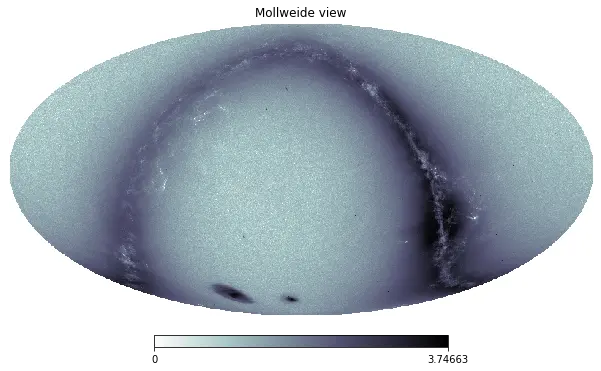
Also note that you can also use any aggregate function, and not only produce count maps.
This is an example that estimates the average of the shapeexp_e1 field for "exponential" morphological model galaxies:
SELECT udf.hp_ang2pix(12, ra, `dec`, True, True) as hpix_4096_nest, AVG(shapeexp_e1) as avg_shapeexp_e1
FROM cosmohub.legacy_survey_dr8_phz
WHERE `type` = 'EXP'
GROUP BY udf.hp_ang2pix(12, ra, `dec`, True, True)
7. Why can vary so much the performance of similar queries?
Current CosmoHub implementation is built on top of a Hadoop cluster. Resources are shared between all users. We have configured two different queues, one for the real-time analysis and another one for creating the custom catalogs. Resources are shared between users and therefore depending on the number of concurrent queries the performance can vary a lot.
8. How can I contact you to ingest my large dataset?
You can contact us via email.
9. I don't want to use CosmoHub anymore. How can I remove my CosmoHub account?
You can remove your account via email.
10. Is there any tutorial?
More or less. Soon, you will be able to look at some videos in our CosmoHub YouTube Channel!
11. Why is CosmoHub so awesome?
CosmoHub is built on top of the Apache Hadoop:
"The Apache Hadoop software library is a framework that allows for the distributed processing of large data sets across clusters of computers using simple programming models. It is designed to scale up from single servers to thousands of machines, each offering local computation and storage. Rather than rely on hardware to deliver high-availability, the library itself is designed to detect and handle failures at the application layer, so delivering a highly-available service on top of a cluster of computers, each of which may be prone to failures."
CosmoHub also uses Apache Hive:
"The Apache Hive data warehouse software facilitates reading, writing, and managing large datasets residing in distributed storage using SQL. Structure can be projected onto data already in storage. A command line tool and JDBC driver are provided to connect users to Hive."
We have set the platform so that queries over large tables are really fast:
- Hive uses the Apache Tez Apache Tez execution engine instead of the venerable Map-reduce engine
- We configure Hive to use ORCfile, a new table storage format that sports fantastic speed improvements through techniques like predicate push-down, compression and more. Using ORCFile for every HIVE table should be extremely beneficial to get fast response times for HIVE queries.
- We have used the vectorized query technique, which improves performance of operations like scans, aggregations, filters and joins, by performing them in batches of 1024 rows at once instead of single row each time.
In particular we use one of the most popular Big Data solution built on top of Hadoop, Hortonworks. Our platform uses Hortonwork Data Platform, which includes HDFS, YARN, MapReduce, Hive and Ambari.
The frontend of CosmoHub is a responsive Web interface powered by: Vue 3 (progressive JavaScript framework), Nuxt 4 (full-stack framework), PrimeVue (UI component library), UnoCSS (utility-first CSS framework), and TypeScript for type safety and better development experience.
And finally the backend is a ReST API powered by Flask, which includes the folowing libraries: flask-restful (ReST framework), sqlalchemy (database ORM), websockets (bidirectional communications), gevent (asynchronous framework), pyhive (hive connection library) and pyhdfs (hdfs bindings).